Onboarding for Surf Schools
Get your school ready, step by step.
Step-by-step guide, built for schools that never used a platform before. Every step has a time estimate and a direct link to the right screen.
1
Create your school account3 min
Create the account here on the web, or in the Surf Booking app if you are on your phone. It is the same account on SurfBooking OS, the app and the Channel Manager.
What the account gives you:
Create account on the web
Download the app
- SurfBooking OS on the computer: lessons, bookings, tides and agent mode on a big screen
- Push notifications for bookings, check-ins and student chat
- Valid email, school name (editable later), PT-format phone, strong password (12+ chars, 1 upper, 1 lower, 1 number, 1 symbol)
2
Verify your email1 min
We email you a link. You click it and come back here. Done.
Don't see the email? Check spam. If still missing after 2 min, we have a resend button right in the modal.
3
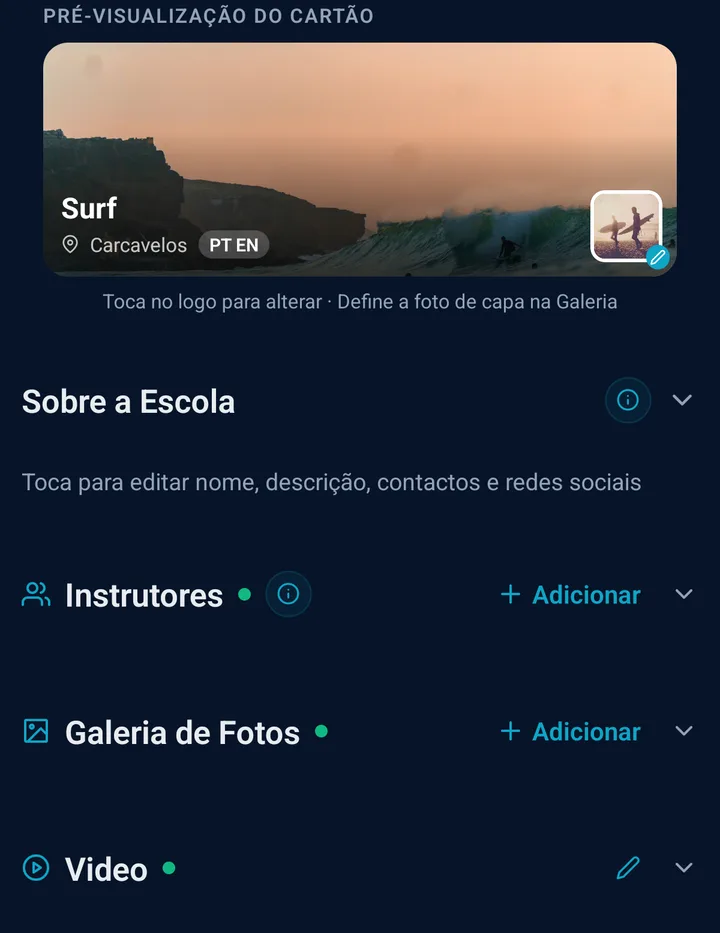
Complete the profile3 min
Tab "Definições" → upload logo + cover photo, pick your primary beach, set access code for login.
Primary beach matters:
- Decides where your school shows on the marketplace
- Powers the forecast cards on your dashboard
- You can teach at other beaches too (Staff tab → Allowed spots)
Tip: Use a square logo (at least 400×400px) and a landscape cover (1200×600). Makes your marketplace card pop.
4
Create your first lesson3 min
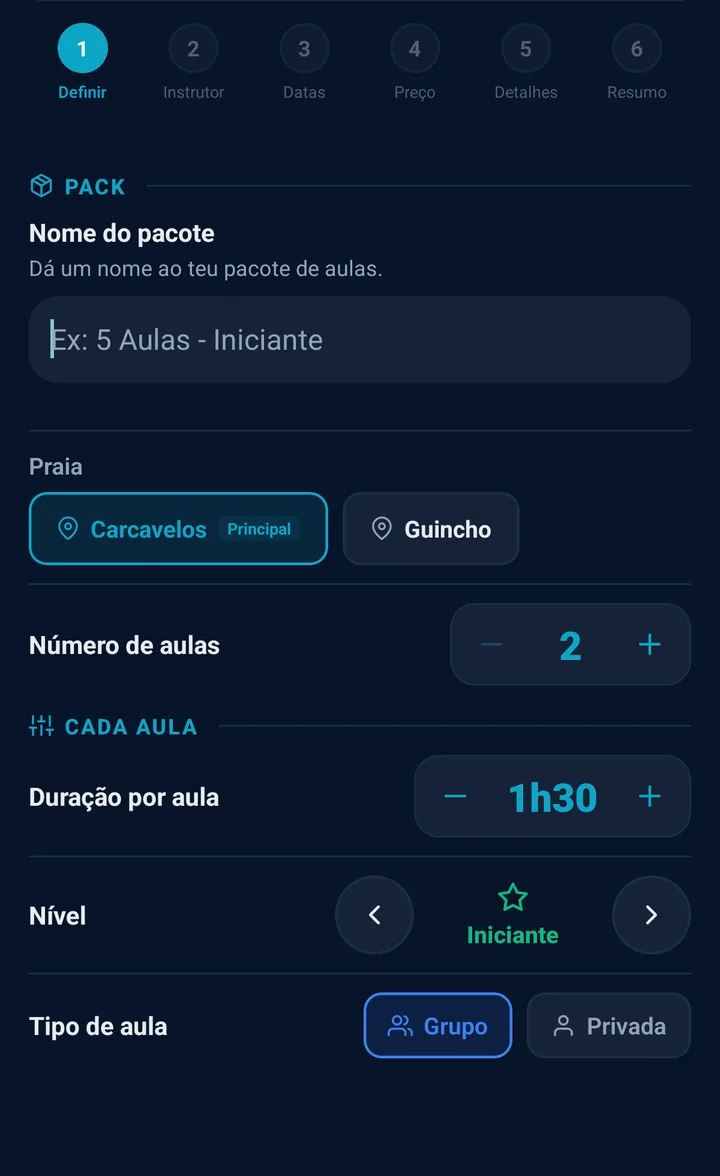
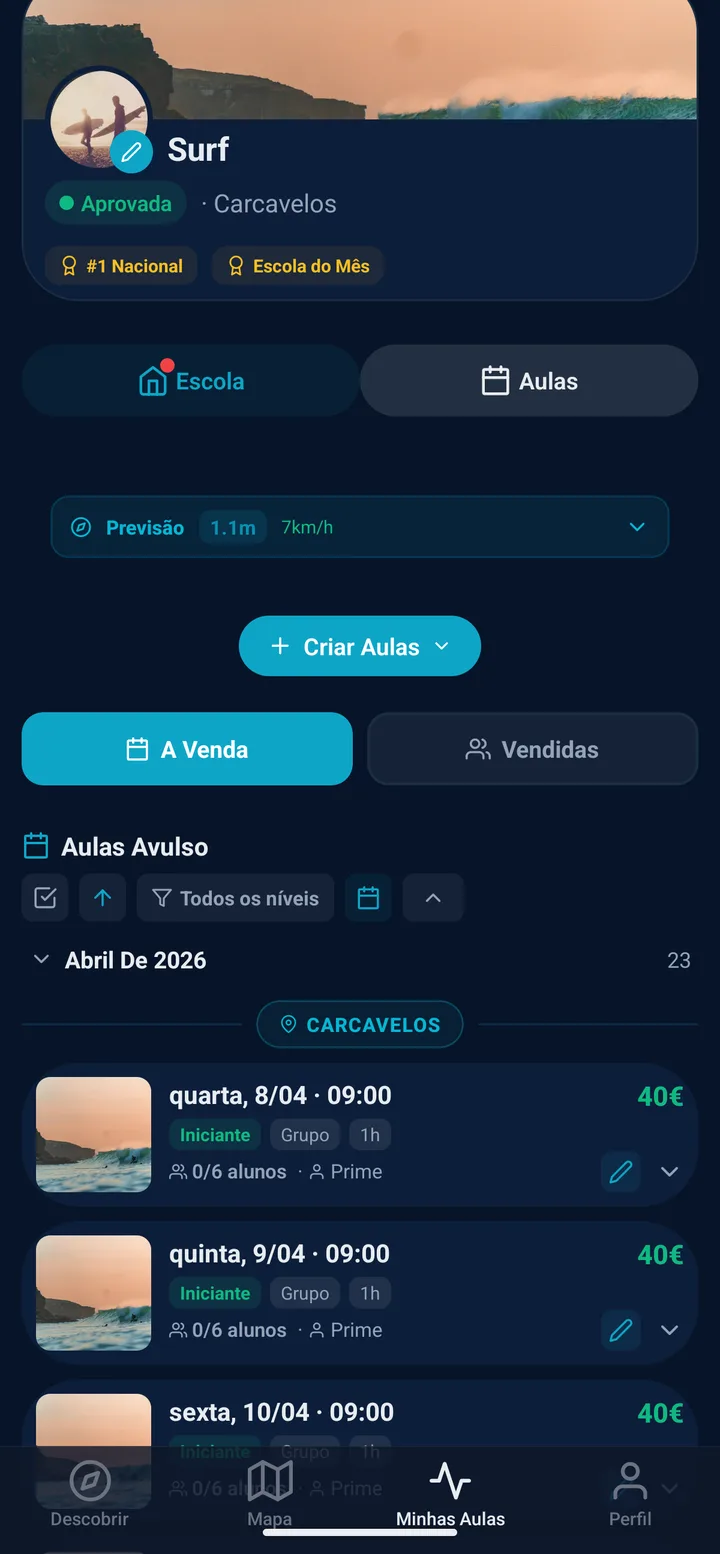
Click “Criar Aula” on the dashboard. A 3-step wizard opens.
Wizard steps:
- Step 1 (essentials): mode (single or bulk multi-day), date, time, beach, level, group/private
- Step 2 (details): instructor, price, max students, duration, equipment included, photo
- Step 3 (review): check everything, click Create
Bulk mode: great for recurring classes. Pick a date range + weekdays + hours → creates up to 120 lessons at once. You can also preset different hours for each day.
Already have a season in a spreadsheet? You do not have to retype it. There is a fifteen-column template you fill and upload, and a button that undoes the whole batch if it lands wrong. How the import works →
5
Connect payments5 min
With payments connected, the money goes straight to your bank account and never sits with us. Our 20% commission comes off only the bookings we brought you. On a walk-in or a sale through your own direct channel we take nothing: you pay just the card processing fee.
What you need to connect payments:
- Business NIF
- Portuguese IBAN for payouts
- Copy of your ID (selfie verification)
- Proof of address (utility bill, bank statement)
Without payments connected you can still sell, and the amount is held until you connect them.
✓
Bookings start coming inauto
Your lesson is now on the Surf Booking marketplace and your school's public page. When someone books:
- You get a push notification + email
- The payment is recorded in your payments account, minus our 20% because this one came from the marketplace
- From there it goes to your IBAN (daily or weekly, your choice)
- Student gets a QR code — scan on the beach = instant check-in
- If you have a waiver, the student signs it digitally before the lesson
And then? What the panel asks for next
Six steps get you selling. The panel keeps a list of eight.
We would rather you saw the other five here than discover them the moment you walk in. None of it has to happen today: the panel shows you what is missing before you can sell.
- Complete the school profile That is step 3 above.
- Create the first lesson or pack That is step 4 above.
- Connect payments That is step 5 above.
- Verified school badge
The verified school badge is given by us after we check your school. You don't have to send anything. - Put your gear into Stock
Wetsuits, boards and leashes by size. It is what lets the system pick the right size for each student without you thinking about it. - Create your first instructor
With no instructor there is no ratio to validate, and it is the ratio that stops a lesson from being born overbooked. - Set up the digital waiver
Signed on the phone before the lesson. A minor needs their guardian to sign. - Embed the widget on your site
Optional, and the only one on the list that stays unticked - it sits there so you have it at hand if you ever get a site.
What’s new — straight to the point
Three differentiators most schools haven’t found yet. Shortcuts below.
Progress Passport
At the end of the lesson the instructor ticks what each student achieved, and it stays on that lesson's stamp. Students carry their progress from school to school.
See Progress Passport →
Agent mode
Press A and speak: «show the tides», «create a lesson on the 24th at 3pm». The OS does it in front of you and asks before touching bookings.
Open SurfBooking OS →
iCal setup wizard
Google Calendar, Outlook, Apple — one calendar. Clashes flagged in your calendar. 5-min setup.
Open Channel Manager →
Once you're live: unlock more
These features aren't essential to launch, but most schools activate them within the first 2 weeks.
Express QR on the beach
Walk-up tourist, QR scan, pays. No app install needed. Ideal for summer street presence.
Channel Manager
Register lessons sold outside Surf Booking (your site, Instagram, phone). One calendar, clashes flagged. 0% commission on externals.
Digital waivers
Students sign on the phone. Guardian co-signature for minors. Liability waivers the school edits.
Team (staff)
Invite instructors. Granular permissions per role. Certification tracking. Multi-beach scheduling.
Waitlist
Lesson full? Student joins the queue. If someone cancels, waitlist gets notified automatically.
Extras
Sell photo packs, transport and rentals to students at booking time. Your price, your margin.
Reports
Revenue breakdowns by instructor, beach, level, weekday. Month picker. No Excel required.
Badges
Mark students as VIP, loyal, fast learner, rapid progress. Visible to your whole team.
Common questions
How much does it cost?
Free. 0€/month. We take 20% commission only on the bookings we bring you through the Surf Booking marketplace. On walk-ins and your own direct channel our commission is zero and you pay just the card processing fee. No commission either on lessons you register in Channel Manager (external sales). Channel Manager at no cost: just keep lessons on sale with us. Full pricing →
Do I need to connect payments?
Yes, to receive money through the marketplace. Setup takes a few minutes, verification is usually quick. If you only want to use Channel Manager (register external bookings), you can skip this step — but you won't appear on the marketplace.
When do I get paid?
With payments connected, your share sits in your payments account when the student pays: the full price minus the card processing fee, and minus our 20% only if the booking came from us. From there it goes to your IBAN on the processor's schedule. Without payments connected you can still sell, and the amount is held until you connect them.
What if a student cancels?
Refund policy is automatic based on time before the lesson: 100% refund if >96h, 75% if 48–96h, 50% if 24–48h, 0% if <24h. You can override for any booking in the admin panel.
Do you have an app?
Yes — iOS and Android. Use it for beach ops: check-in QR scanner, lesson view, team, waivers, notifications. SurfBooking OS (this guide) is web-only — runs better on a bigger screen when creating lessons or doing analytics.
I'm stuck. Who do I contact?
Email [email protected] or open Support in SurfBooking OS. We answer within business hours.