SURFBOOKING OS
The school's computer, arranged like a desk
The owner uses the panel in the middle of something else: the phone rings, a student arrives, and when they come back they no longer know where they were.
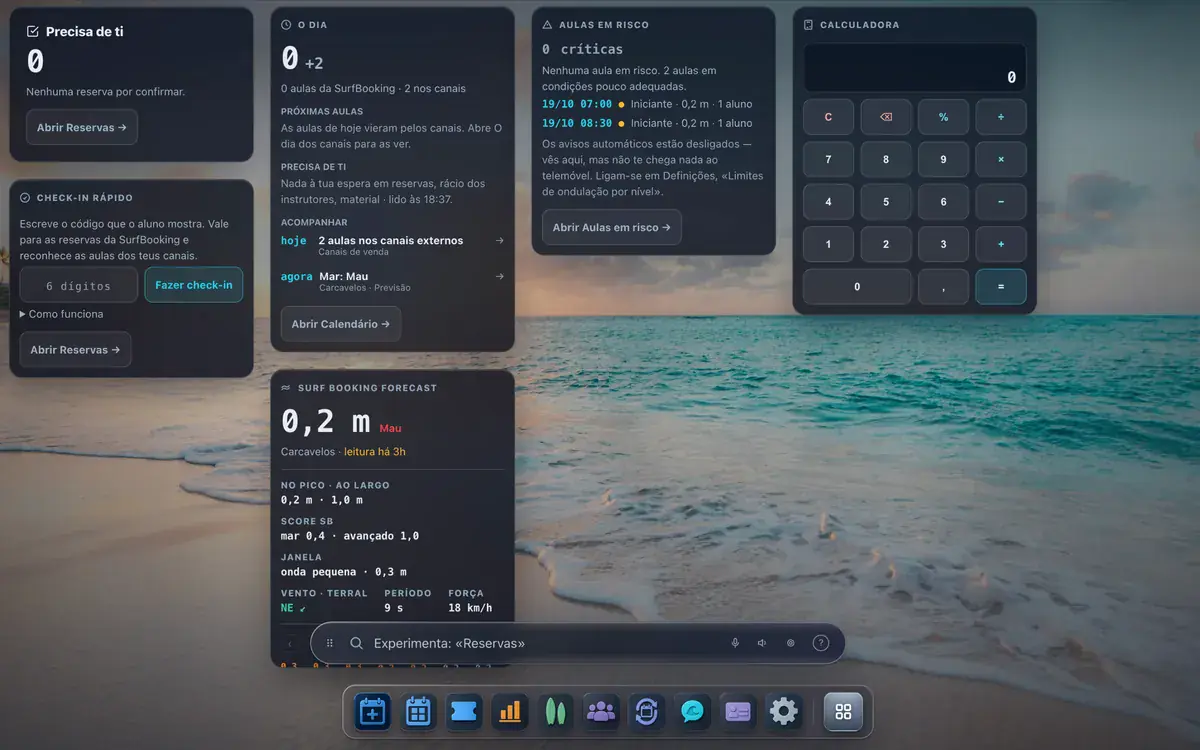
The school's panel opens like an operating system: a desktop with widgets, each tool in a window, a dock and a bar where you type what you want. The desktop stays the way you left it.
En production depuis avril 2026, entre les mains d'écoles de surf.
COMMENT ÇA MARCHE
Four steps.
The desktop
Widgets with what matters now: today's lessons, the sea and what needs you. You choose which ones show and where.
One window per tool
Calendar, bookings, gear and the rest each open in their own window, several at once, and minimise to the dock.
The bar
Type the name of an app to open it, or ask a simple question like «how many lessons do I have tomorrow?» and the answer appears right under the bar. Everything else goes to Kai.
It stays as you left it
The widgets, the dock and the wallpaper are saved to your account and come back on another computer.
Avec quoi ça marche.
Each instructor opens their own day, and only theirs
Each instructor signs in with their own account and sees their lessons, with the students, the beach…
LireYour lessons on the front-desk TV, with a QR to book
One address, pasted into the browser of the TV you already own. It shows the next lessons with the…
LireThe tide runs 50 minutes late every day. Your timetable does not.
You say which tide that lesson works on — low, rising, high — and the hour stops being yours and…
Lire
Tu veux ça dans ton école ?
Nous ne prenons de commission que lorsque l'élève vient de chez nous. Sur ton canal direct et au comptoir : zéro commission SurfBooking.
Ça tourne dans SurfBooking OS. La page pour les écoles te dit ce que ça coûte et comment on commence.